Imagine your products landing directly in your customers’ purchasing systems—in real time, with up-to-date prices and availability. Dynamic catalogs, also known as punchout catalogs, make this possible. They help you, as a supplier, increase sales and customer loyalty. This article provides an overview of the three most important approaches: cXML punchout, OCI catalog, and IDS Connect.

What are dynamic catalogs?

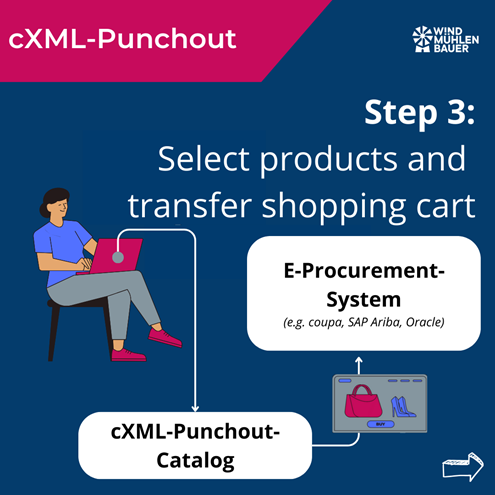
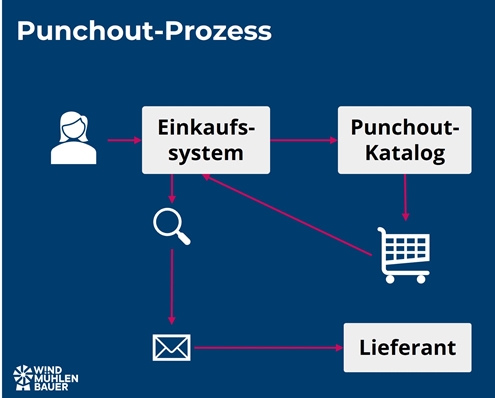
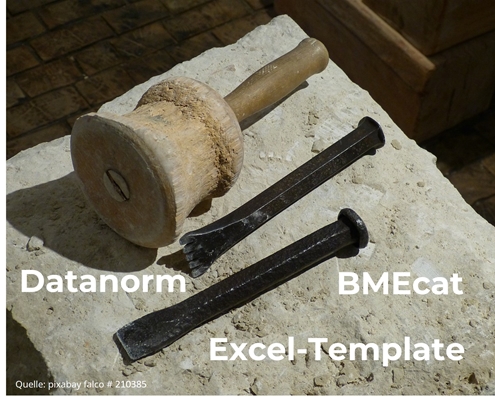
Dynamic catalogs seamlessly connect websites (e.g., web shops) with the customer’s purchasing system. Unlike static catalogs such as BMEcat or DATANORM, they update themselves in seconds without manual maintenance. Punchout catalogs can be integrated into ERP systems (e.g., SAP, HERO), e-marketplaces (e.g., simple system), or e-procurement systems (e.g., coupa, SAP Ariba). After implementation, the customer’s specialist departments are given access to the catalog. The respective employee selects the supplier and is automatically redirected to the dynamic catalog. There, the desired items are placed in the shopping cart and transferred back to the purchasing system. An order has now been created. The usual processes then take place, such as approval by the budget manager and transmission of the order to the supplier.
punchout catalog
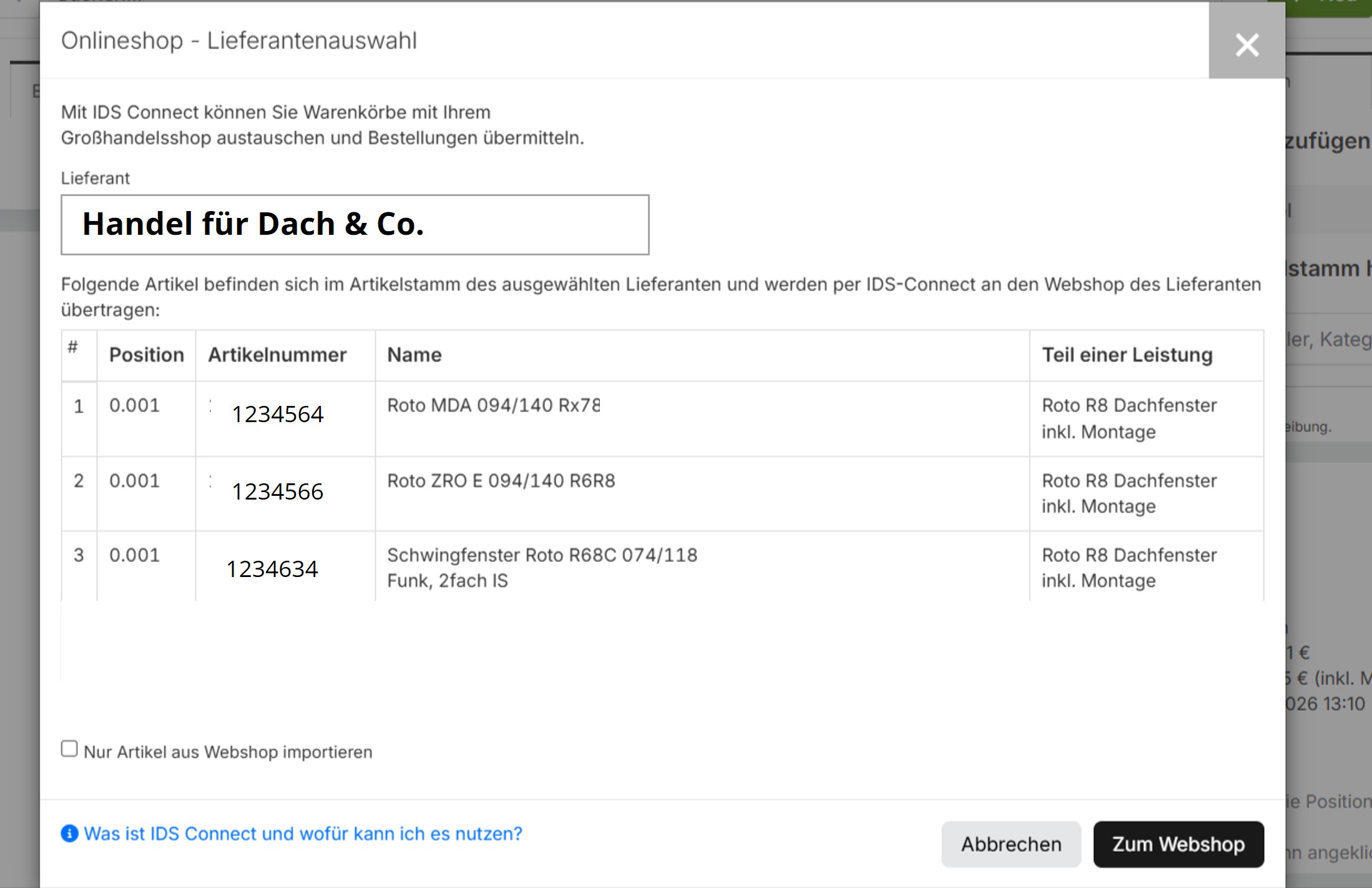
Jump to the punchout catalog from the HERO ERP system

What are the advantages of such catalogs?

As a supplier, you benefit from the following advantages:

  • You stay in control of your data: prices, stock levels, and configurations are always up to date.
  • Customer uses your solution (e.g., online shop) but stays in their shopping system.
  • Fewer errors, no price differences or queries

An overview of the three technical approaches

Each approach integrates external punchout catalogs into customer systems. The technology varies depending on industry standards and system landscapes.

OCI Catalog (Open Catalog Interface)

OCI, developed by SAP, is the standard for ERP and e-procurement systems such as SAP, Onventis, and Mercateo/Unite. This standard is particularly prevalent in large purchasing organizations. The goal is always to use current item data and prices for purchase orders.

cXML Punchout

cXML punchout is used in e-procurement systems such as SAP Ariba or Coupa. Its purpose is the same as that of the OCI catalog. Only the technical structure differs.

IDS Connect for craftsmen

Immer mehr Handwerksbetriebe, aus dem Branchen SHK (Sanitär-Heizung-Klima), Elektro oder Bau, setzen auf Handwerkersoftware. Diese spezialisierten ERP-Systeme haben die Standardschnittstelle IDS-Connect bereits integriert. Damit kann der Artikelstamm aktualisiert werden, Angebote geschrieben oder Bestellungen getätigt werden.

Why are punchout catalogs an important sales argument?

Does your customer use the “Preferred Supporter” label? Then you are dealing with a modern company. These customers reward suppliers who simplify the purchasing process. For example, through interfaces that help with data maintenance. That is why the ability to offer punchout catalogs is an important selling point. Because it can deliver the following benefits to the customer:

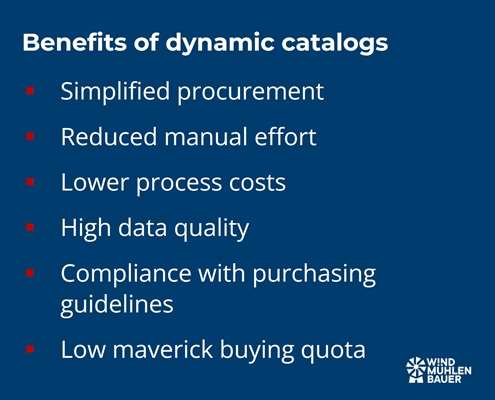
  • Simplified procurement: Employees place orders in their own system without media discontinuity or manual order forms.
  • Manual effort is reduced: item data and prices are transferred automatically, eliminating the need for manual order entry.
  • Reduction in process costs: Transaction costs per order are falling significantly
  • High data quality: Always up-to-date prices and availability
  • Compliance with purchasing guidelines: Budgets and approval workflows are automatically applied and can be set across suppliers.
  • Low maverick buying rate: High user-friendliness means employees use the predefined channels.
  • Assortment management: Integration means that preferred suppliers are “firmly established,” allowing orders to be bundled with the “preferred supplier.”
punchout catalog

How do I acquire the technical ability?

The classic approach involves using your own online shop and programming the required interfaces. This approach makes sense, as customer-specific prices, availability, and product data are already available in the web shop. A punchout catalog can also be implemented in other ways. The following methods are used in the market:

  • In-house development: Developing the interfaces ourselves and keeping them up to date
  • Plugins: Purchasing a plugin (external extension) turns the online shop into a punchout catalog. These modules are ready-made extensions for systems such as Magento, Shopware, Shopify, or Adobe Commerce.
  • Out-of-the-box solution: Standard solution that generates a punchout catalog at the touch of a button using data from Excel or BMEcat. This is the cost-effective and fast solution.

Can my customer find the items using the search function in the shopping system?

Dynamic catalogs are controlled by jumping to an external website and transferring the shopping cart back. Therefore, the items cannot be found using the cross-supplier search in the ERP or purchasing system.

This disadvantage was recognized and solved with further developments in punchout techniques. With the following versions, no jump is necessary and items are displayed via the comprehensive search:

  • OCI 5.0 with Background-Search
  • cxML Punchout Level 2

What are the requirements for product data?

In addition to images, descriptions, documents, and customer net prices, there are two important pieces of information. These include the units of measure and the classification code.

Units of measure

Unit of measure (UOM) refers to the code that defines the unit to which the net price relates. For example, the code C62, ST, or STK can be used for the unit “piece.” These are stored for each item and must be harmonized with the customer’s logic. If the code or value is not stored with the customer, a transmission error will occur.

Classification Code

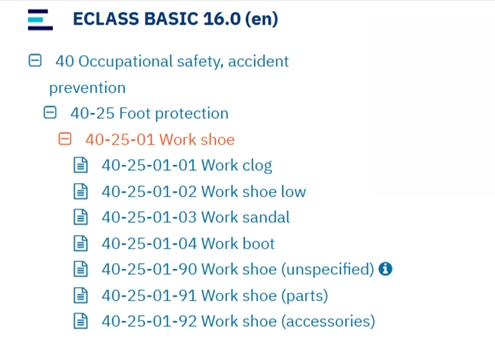
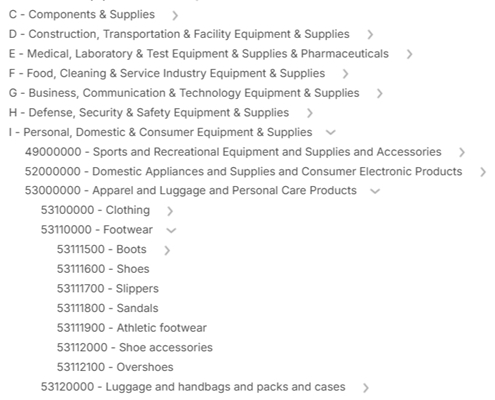
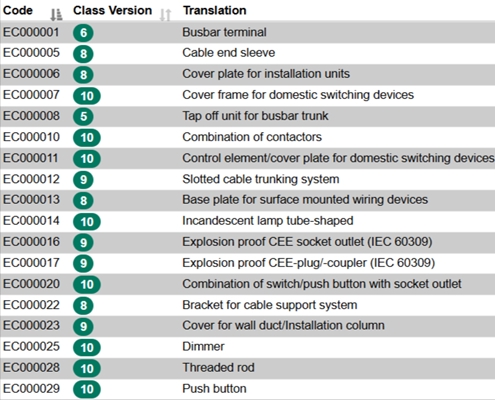
Classification codes are used for purchasing and financial processes. The E-Class, UNSPSC, and ETIM standards have become established. These specify the product group and partially standardize the product characteristics (e.g., ETIM). This code must be transferred for each item in the shopping cart when it is sent to the customer system.
Conclusion

Dynamic catalogs make your sales more efficient. This is because the painstakingly negotiated framework agreement is anchored in the customer’s system. This increases your visibility and allows the customer’s specialist departments to order items quickly.

That’s why it’s a good idea to invest in punchout catalogs. With modular systems that let you expand your online shop using plugins, or out-of-the-box solutions that generate a complete dynamic catalog from an Excel file at the click of a button, you can make big strides even on a small budget.

My recommendation: Start with an out-of-the-box solution. This can be set up in 2-3 hours and implemented immediately with your first pilot customer. Inform your colleagues in IT or the online shop team and sell this as a first step to conserve their resources. Your first customers will be thrilled, and you will have good arguments for implementing it in your own online shop!

Expert in corporate development

Peter Prütting is an expert in value-oriented and digital business development. With over 15 years of sales experience from the perspectives of wholesale, manufacturing, and e-marketplaces, he takes a holistic view. His colleagues value him as a customer-centric and focused leader who guides teams through digital transformation. Away from his daily work, he recharges his batteries by mountain biking.

Looking for a punchout catalog?

We help you find the right solution and implement it quickly.

FAQ – Frequently asked questions

What exactly is a dynamic catalog?

A dynamic catalog (also known as a punchout catalog) connects your online store directly to your customer’s purchasing system. Prices, availability, and product data are automatically transferred in real time. This allows your customer to access, select, and order your products directly in their system—without having to enter any data manually.

What is the difference between dynamic and a static catalogs?

A static catalog (e.g., DATANORM, BMEcat) must be updated manually on a regular basis. A dynamic catalog, on the other hand, updates itself automatically via an interface. Changes to prices or items are visible immediately, saving time and avoiding errors.

What are the advantages for me as a supplier?

Your data remains up to date and under your control. Customers can see your prices and stock levels directly. Order processes run faster and without errors. You retain your customers in the long term, which increases your chances of follow-up orders.

What types of dynamic catalogs are there?

Different standards are used depending on the customer system:
➡️ IDS Connect: mainly used in craftsman ERP systems such as HERO.
➡️ OCI catalog (Open Catalog Interface): standard for SAP, Onventis, or Mercateo.
➡️ cXML punchout: frequently used for large platforms such as SAP Ariba or Coupa.

How can I provide such a catalog?

There are three ways: #1 In-house development: You program the interface yourself. #2 Plugin: You purchase an extension (e.g., for Shopware, Magento, Shopify). #3 Standard solution: You use a ready-made “out-of-the-box” version—ideal for a quick start.

What are the requirements for product data?

Complete product information is important. In addition, the units of measurement must be coordinated. Most customers also require classification codes according to E-Class, UNSPSC, or ETIM standards. This information is crucial for ensuring that data exchange with the customer’s system runs smoothly.

Can my items be found through the customer’s search?

This was not possible in older versions, as the process involved jumping to an external website where the shopping cart was sent to the original system. Newer versions such as OCI 5.0 or cXML Punchout Level 2 offer an integrated search function, meaning that your items appear directly in the search results of the customer’s system.

Why do dynamic catalogs increase my sales?

Because your products are right where customers shop. No unnecessary searching or detours via websites are necessary. This increases convenience and trust and leads to additional sales.

Sources

The digitization of purchasing processes between business partners (B2B) is advancing steadily. This requires the upload of product data to online shops, e-procurement systems, or e-marketplaces. This is where BMEcat converters come into play. Learn all about the best BMEcat converters for your company. I compare the top 5 providers and explain how the software automates your product data management, saves costs, and increases efficiency.

What is a BMEcat converter?

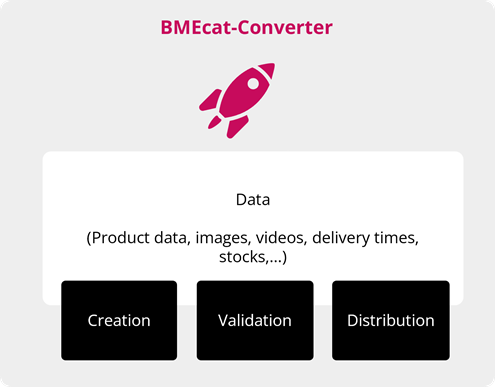
A BMEcat converter, also known as a BMEcat generator or BMEcat software, helps convert product data into XML format. XML is a structured data format that exchanges information between IT systems. With BMEcat, the structure is standardized according to the specifications of the German Association for Materials Management, Purchasing and Logistics (BME). BMEcat has become the standard for exchanging product information in industry. A BMEcat converter translates various file formats into the electronic catalog of the same name. Its basic functions include creation, validation, and distribution. We will look at how these functions interact in the next section.

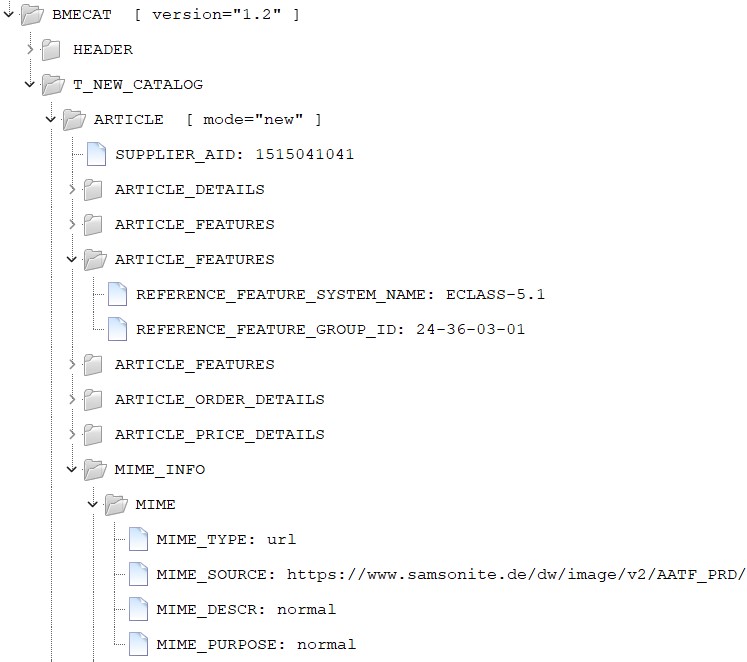
Structure of a BMEcat opened in the XML Tree Editor program

How does such software work?

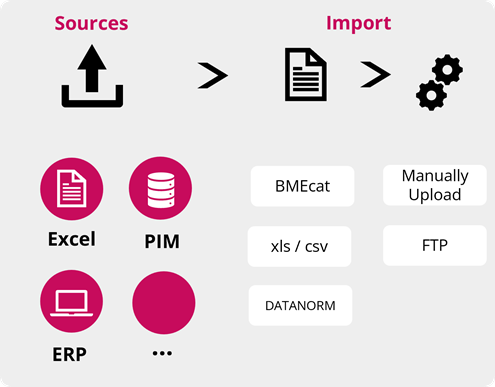
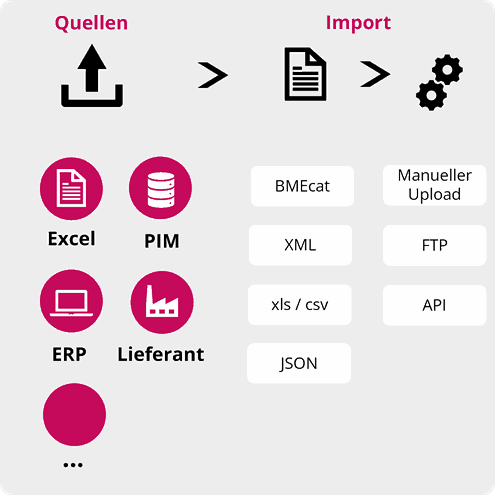
To create a BMEcat, product information such as images, texts, article characteristics, customer prices, and classifications (e.g., E-CLASS or UNSPSC) are required. These are made available via import channels. Depending on the maturity of the software, various formats such as Excel, CSV, JSON, or XML can be imported. The BMEcat converter handles the “translation” into BMEcat. Validations are performed during this step. These are based on the target system or customer requirements. A classic example is units of measure, known as UOMs. To illustrate this, let’s take the following example. In the import file, the designation “ST” is specified for the unit of measure “piece.” However, the target system requires “PCE.” Such differences can be analyzed by the validation and translated into the language of the customer system. Once the catalog has successfully passed the check, it moves on to the third step, “Distribution.” If the target system allows automatic uploads, the software can do this automatically.

Infrastructure of a BMEcat converter

bmecat software
bmecat software
bmecat software

What are the advantages of introducing a BMEcat converter?

A BMEcat converter supplements existing solutions such as PIM systems (Product Information Management) or ERP systems with the following advantages:

  • Improved data quality: Standardization of BMEcat allows product data to be positioned in the right place. This leads to improved quality, as the information arrives correctly in the target system and has a positive impact on search results. It also helps to avoid manual errors.
  • Increased efficiency: Automating the creation and management of electronic catalogs saves time and resources.
  • Seamless integration: BMEcat’s XML-based format ensures seamless integration with existing systems such as ERP (enterprise resource planning), PIM (product information management) systems, e-marketplaces, and e-procurement systems. This optimizes data flow and eliminates the need for manual data maintenance.
  • Cost savings: Process costs can be reduced by minimizing errors through automated validation and process optimization. By process costs, I mean the amount of working time spent on maintaining, creating, and distributing BMEcats.
  • Customer loyalty: By uploading product data to purchasing systems, customers can place orders quickly and easily. In addition, manual input errors are avoided and customers have access to up-to-date information.

How is BMEcat software developing?

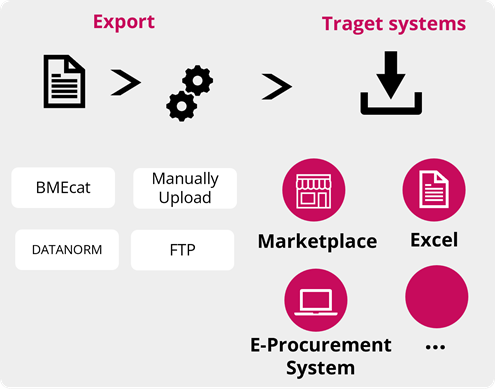
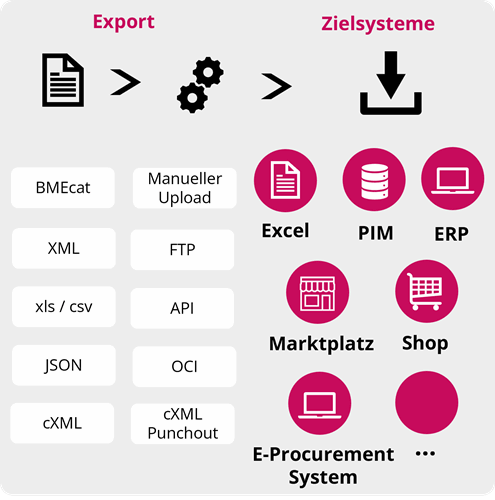
In addition to BMEcat, there are other electronic catalog formats. These include Datanorm, Ariba cif, and Coupa’s own CSV format. There are also numerous API interfaces that exchange product data between systems in real time. Custom CSV formats are also on the rise, posing major challenges for data suppliers. To cope with this complexity, BMEcat software solutions are evolving into e-catalog management solutions. In addition, AI (artificial intelligence) will simplify the “refinement” of electronic catalogs in the future. One possible application is the automated assignment of classifications (e.g., E-CLASS, UNSPSC, ETIM) at the item level. Initial approaches are also being taken in the creation of texts. This allows individual texts to be created automatically for target groups and systems.

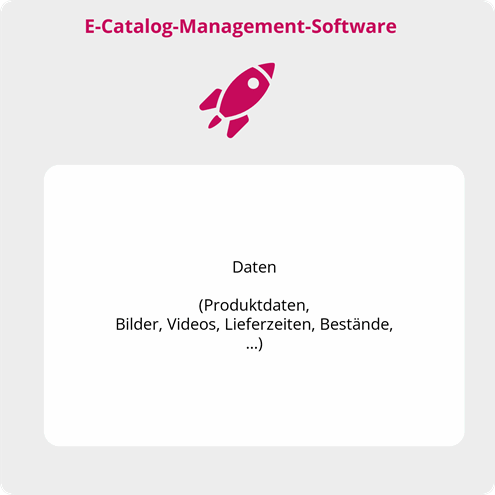
Infrastructure of e-catalog management solutions

Top 5 BMEcat converters at a glance: e-proCAT, nexoma, Pro3Con, Storeserver, and PIM providers

e-pro – e-proCAT

bmecat software

e-pro CAT GmbH is one of the leading providers of catalog solutions with over 1,000 customers. With its roots in the Fraunhofer Institute IAO and as a co-founder of the BMEcat standard, e-pro CAT GmbH has over 20 years of experience in the development of electronic catalogs.

Selected features:

  • Classify from E-CLASS to UNSPSC and from UNSPSC to E-CLASS
  • Extensive validation options
  • Deleting links to invalid MIME files. MIME is used to process images, data sheets, and other attachments.

nexoma – CatalogExpress

bmecat software

The interdisciplinary team at nexoma combines expertise in project management, software development, architecture, design, and media design. Their focus is on developing and implementing powerful software solutions for product data management. With its CatalogExpress software solution, nexoma supports companies in the efficient transformation and distribution of data across various channels.

Selected features:

  • Conversion into complex standards such as FAB-DIS, BMEcat ETIM, or ETIM xChange
  • Standard interfaces to PIM systems such as Akeneo, Apollon, Contentserv, ViaMedici, Pimcore or the Shopware store system

Pro3Con – Primus Catalog

bmecat software

Pro3Con GmbH is a software provider in the field of automated product data distribution. The focus is on providing customized solutions for the creation and integration of e-catalogs and web shop systems. With a deep understanding of the digital transformation of business processes, Pro3Con supports companies in making their procurement and sales processes more efficient.

Selected features:

Storeserver

bmecat software

Founded by managing director Dipl. Inf. Sven Sprandel in close cooperation with Fraunhofer IAO, the company’s origins lie in the development of the openTRANS/BMEcat exchange format. This was implemented as the first priority with the Storeserver BMEcat Generator and has been continuously developed ever since.

Selected features:

  • Converter works on an Excel basis and can be used locally
  • Flexible extension of BMEcat fields

PIM systems (Product Information Management)

bmecat software

Many PIM providers have implemented the BMEcat format. Unlike BMEcat converters, PIM systems are geared toward internal logic. These reach their limits as soon as customers and target systems make specific demands. The solutions can be requested and implemented as programming requirements through change requests. If this is too time-consuming and expensive, the specialist department can rework it manually.

Selected features:

  • BMEcat standard with internal logic

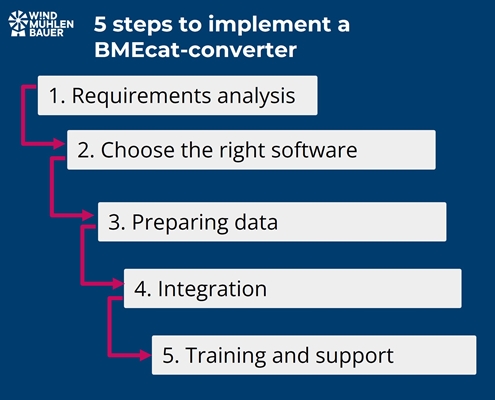
Five important steps for the introduction of BMEcat software

bmecat software
  1. Needs analysis: Before implementing a BMEcat converter, it is important to assess your business needs. Determine the scope of your product portfolio, the complexity of the product data, and the integration requirements.
  2. Selecting the right software: Based on the needs analysis, it is important to select the right software. Important criteria include user-friendliness, existing interfaces, scalability, the provider’s knowledge of the target channels, joint development potential, and the pricing model.
  3. Data preparation: Product data is essential. Prepare your existing product data for migration. This may include cleaning up data, standardizing formats, and ensuring that all necessary information is complete and accurate.
  4. Integration: Integrate the BMEcat converter into your existing systems. It is best to get your IT colleagues on board right from step 1. To reduce manual tasks, seamless integration into existing systems is recommended. If you mainly work with Excel, you can start integrating the target systems right away.
  5. Training and support: Provide training for your team so that they can learn how to use the new software. Also, ensure that they have access to ongoing support to resolve any issues that may arise.

Conclusion

The introduction of a BMEcat converter is a valuable tool for establishing professional product data and catalog management. It allows manual and small-scale work steps to be automated piece by piece. This results in up-to-date data in the target systems and increased customer satisfaction.

With standardized data formats, comprehensive functions, and scalability, software providers for the creation of BMEcats offer numerous advantages, including improved data quality, increased efficiency, and cost savings. Careful needs analysis, selection of the right software, and focused implementation can achieve rapid optimizations.

In an age of advancing digital transformation and the growing importance of e-commerce, rapid, high-quality updates to product data are the foundation of sales. Are you ready to optimize your digital sales processes and reap the benefits of BMEcat software?

Expert in corporate development

Peter Prütting is an expert in value-oriented and digital business development. With over 15 years of sales experience from the perspectives of wholesale, manufacturing, and e-marketplaces, he takes a holistic view. His colleagues value him as a customer-centric and focused leader who guides teams through digital transformation. Away from his daily work, he recharges his batteries by mountain biking.

FAQ – frequently asked questions

What is a BMEcat converter?

A BMEcat converter is a piece of software that converts product data into the standardized XML format BMEcat. This format enables the exchange of product information between different systems in the B2B sector. The software automatically validates and distributes the data.

How does a BMEcat converter work?

A BMEcat converter imports product information from various file formats such as Excel or CSV and translates it into BMEcat format. The data is checked for errors and adapted to the requirements of the target system. Once successfully validated, the data can be distributed automatically.

What advantages does a BMEcat converter offer?

A BMEcat converter improves data quality, automates processes, and thus saves time and money. It also enables seamless integration into existing systems and increases efficiency in product data maintenance.

How do I choose the right BMEcat converter?

The selection depends on various factors such as the complexity of the product data, the integration requirements, and the scalability of the software. Other important criteria include user-friendliness and interfaces to other systems such as PIM or ERP.

How are BMEcat converters developing?

BMEcat software is evolving into comprehensive e-catalog management solutions that support other catalog formats and APIs in addition to the BMEcat format. In the future, AI will be used to automate classification and text generation, further simplifying the process.

Sources

If you want to list items in the Coupa Supplier Portal, there is no way around the catalog format Coupa CSV Catalog or Punchout Catalog. Find out what the “Coupa CSV Catalog” is and how your company can create such catalogs.

What is the Coupa catalog?

The Coupa catalog is an electronic catalog in CSV format. It was developed to provide Product Data, images and prices for customers who use the “Coupa” e-procurement portal. The customer can choose from these products and place orders.

What advantages does the Coupa catalog offer?

The sale of products via coupa is possible via the aforementioned catalog or via WebEDI processing. The customer places the order there and the supplier collects it from the online portal. In contrast to the coupa catalog, this process has numerous disadvantages. In addition to the manual activity, data quality is not guaranteed and the supplier can be replaced quickly. In contrast, suppliers who provide a catalog have the following advantages.

  • Customer loyalty: In order to upload a catalog to the Coupa Supplier Portal, the customer’s supplier invitation is required. The articles can be uploaded on this basis.
  • Increased visibility: By providing well-structured and high-quality Product Data, suppliers gain visibility with employees authorized to place orders.
  • Automation: The integration of Product Data, via the CSV catalog in Coupa, ensures up-to-date prices and product information. This means that the subsequent process can be automated without errors using EDI. EDI stands for Electronic Data Interchange and describes the electronic exchange of messages.

What is the difference between the Coupa-Catalog and the Punchout-Catalog?

Coupa offers the integration of articles via two different catalog types. Punchout catalogs offer the advantage that they always provide up-to-date product information and prices. As the data is linked directly via the supplier’s website or online store. This means that customers always have the latest data available. The static Coupa catalog offers the advantage that items can be found via the comprehensive search. By storing the information locally in the Coupa system, items can also be included in favorites lists and workflows. Customers who often buy the same items appreciate this option.

  • Punchout catalog: This type of catalog makes it possible to integrate the supplier’s website or online store into the Coupa platform. In the case of an order, the customer’s employee jumps to the supplier’s website and selects the products there. After the shopping cart is completed, the data is transferred back to Coupa. There, the order is finalized and sent to the supplier. Punchout catalogs are dynamic and automatically update prices or availability.
  • Coupa CSV Catalog: This type of catalog is also known as a static catalog. Product Data, prices and images are uploaded to Coupa via a structured CSV file. After the upload, the customer checks the catalog content and releases it for the requisitioners (employees authorized to order). If the product range or prices change, a new upload and approval by the customer is required.

What does the static catalog look like in csv format?

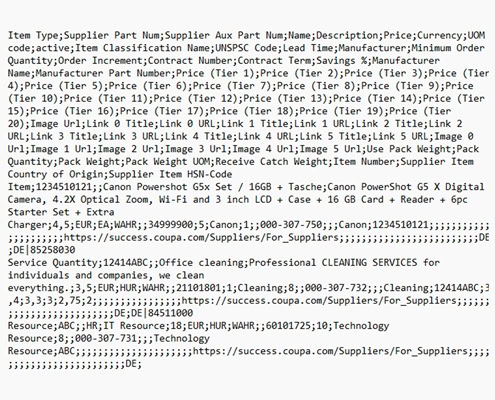
A Coupa catalog in CSV format contains a wide range of information that is important for your customers. Each line in the CSV document represents a product. The most important Product Data includes product names, product descriptions, article numbers, prices, images and delivery times. The following image shows an example catalog, each separated by a semicolon. It can be opened in Excel and displayed in a structured format for maintenance purposes.

coupa csv format
Example of a Coupa catalog

What options are available for creating this catalog file?

There are three catalog creation systems that support you in creating the Coupa catalog. The choice of the right “tool” depends on a few basic conditions. These include the number of catalog files to be created, the maturity level of your organization and whether automation of the process is being considered.

  • Excel to CSV file converter: Coupa provides an Excel template for each project. The information can be maintained manually and then converted to a CSV file.
  • Software for catalog creation: Professional software is used to import the product portfolio from a source system or file, validate it and output it again in the appropriate format. Depending on the target system, the catalog upload can be automated via FTP server. If you are interested, you can read the blog post “Software for electronic catalog creation”.
  • PIM systems (Product Information Management System): If your company already has such a system, you can check whether an export function for individual CSV templates exists or can be programmed.

Conclusion

The Coupa catalog is an important tool for suppliers who want to serve customers and sell items via the Coupa Supplier Portal. Product Data, prices and images can be listed with this catalog in CSV format. The advantage for suppliers is that customers have access to up-to-date data. This increases customer visibility, which generally leads to increased sales and customer loyalty. In addition, up-to-date data is the basic prerequisite for the successful digitalization of subsequent processes. EDI (electronic data interchange) can be used to automatically exchange messages such as orders and invoices. We are currently experiencing a change in the purchasing behavior of business customers. Increasingly, user experiences from the private customer sector, e.g. with Amazon and Zalando, are expected in the business environment. Coupa takes this into account and enables suppliers to position themselves with the Coupa catalog.

Expert in corporate development

Peter Prütting is an expert in value-oriented and digital business development. With over 15 years of sales experience from the perspectives of wholesale, manufacturing, and e-marketplaces, he takes a holistic view. His colleagues value him as a customer-centric and focused leader who guides teams through digital transformation. Away from his daily work, he recharges his batteries by mountain biking.

FAQ – frequently asked questions

What is the Coupa catalog?

The Coupa catalog is an electronic catalog in CSV format that provides Product Data, images and prices for customers using the e-procurement portal “Coupa”. Suppliers can upload Product Data, prices and images from which customers can select and place orders.

What advantages does the Coupa catalog offer?

Firstly, customer loyalty: Requires a supplier invitation from the customer to upload items. Second, increased visibility: Well-structured Product Data increases visibility to employees authorized to order. Third, automation: Integration of Product Data via CSV catalog ensures up-to-date prices and information, reducing process error through EDI (Electronic Data Interchange).

What is the difference between the Coupa catalog and the Punchout catalog?

Punchout catalog: Links directly to the supplier’s website to provide up-to-date product information and prices. The customer selects products directly on the supplier’s website and the data is then transferred to Coupa.
Coupa CSV Catalog: A static catalog where Product Data, prices and images are uploaded via a CSV file. Changes require a new upload and approval by the customer. Items can be integrated into favorites lists and workflows.

What options are available for creating this catalog file?

Excel to CSV file converter: Coupa provides an Excel template that can be maintained manually and converted to a CSV file.
Software for catalog creation: Professional software imports the product portfolio, validates it and outputs it in the appropriate format. The catalog can be uploaded automatically via an FTP server.
PIM systems: Existing product information management systems can be used to export or program individual CSV templates.

Sources

Coupa, catalogs: https://supplier.coupa.com/catalogs/

Acquiring new customers is notoriously exhausting and costs a lot of time and money. Existing customers have already been acquired and greater integration of the supplier into its customers’ processes increases customer loyalty. The cXML punchout catalogue makes an important contribution to this and optimizes the sales process.

Introduction to cXML Punchout Catalog

cXML-Punchout is a standardized interface that facilitates the exchange of Product Data between suppliers and purchasing organizations. This technology was developed by Ariba (now SAP Ariba) to make the integration of product catalogs into purchasing systems efficient and error-free. By using a cXML punchout catalogue, the ordering process is optimized as Product Data is transferred to the purchasing system in real time as part of an order.

➡️ cXML (Commerce eXtensible Markup Language) is a structured format for the exchange of Product Data and messages (e.g. orders) between companies

The ordering process via cXML Punchout

The purchasing process with a cXML punchout catalog takes place in several steps, which can be implemented in purchasing systems such as SAP Ariba or coupa :

Step 1: Supplier selection

The buyer opens his purchasing system and selects the
supplier required. This functionality is available in all standard
purchasing systems.

punchout catalog

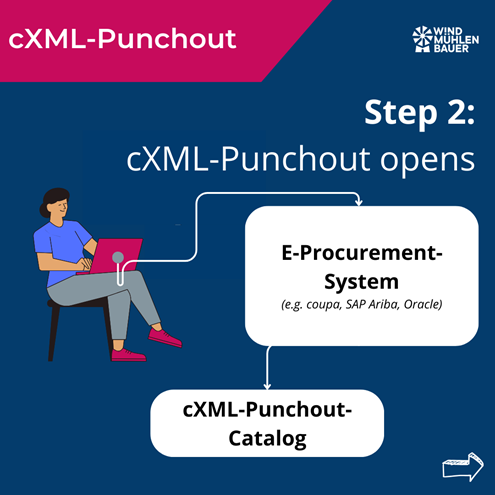
Step 2: Opening the Punchout catalog

After selecting the supplier, the cXML Punchout catalog is opened automatically.

cxml-punchout

Step 3: Product selection

The buyer selects the desired products and adds them to their shopping cart

cxml-punchout

Step 4: Transfer and order

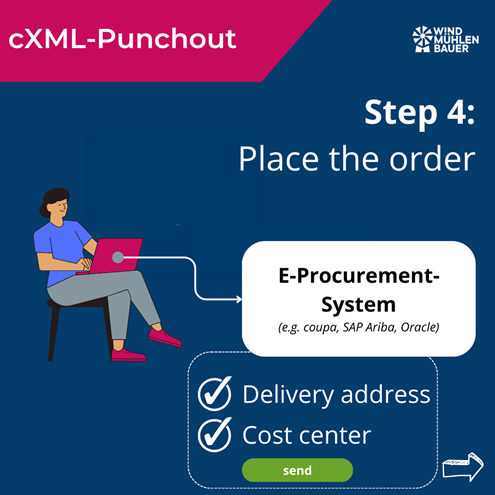
The filled shopping cart is transferred to the purchasing system. There, the buyer enters the delivery address and the cost center and sends the order.

cxml-punchout

Step 5: Internal release and dispatch

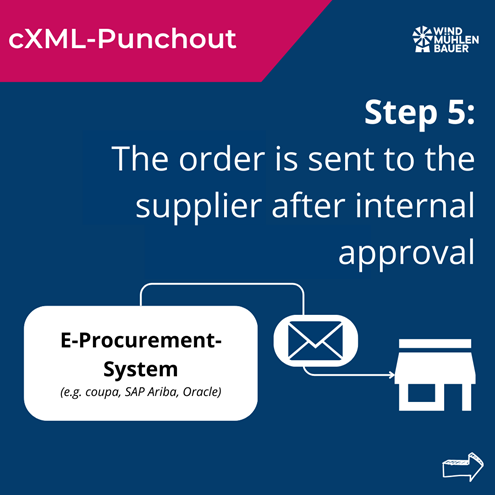
After internal approval, the order is sent to the supplier, who will deliver the goods. The ordering process is independent of the Punchout catalog. The ordering process runs as usual. If the exchange of PDF orders via e-mail has been agreed, the purchasing company will also continue to send PDFs.

cxml-punchout

Overall process:

The buyer selects the desired supplier in the purchasing system. After the selection, the supplier’s cXML Punchout catalog is opened automatically. The buyer selects the desired products and places them in the shopping cart. The filled shopping cart is transferred to the purchasing system, where the buyer enters the delivery address and cost center and sends the order. After internal approval, the order is sent to the supplier, who delivers the goods.

Advantages of a cXML Punchout catalog for suppliers

  • Increased visibility: Product Data, prices and availability are displayed directly in the purchasing organization’s purchasing system. This increases findability and sales.
  • Time savings and error reduction: Automated processes reduce manual effort and minimize input errors.
  • Real-time updating: Product information and prices can be updated at any time. This ensures that the supplier’s and customer’s database is always up to date.
  • Competitive advantage: The provision of a cXML punchout catalog can be a decisive factor in the selection of a supplier.
  • Customer loyalty: Simplified and faster order processing increases customer satisfaction.
  • Automation of business processes: The database enables error-free automation of downstream processes such as order and invoice management.

Advantages for purchasing companies

  • Increased efficiency: The direct integration of supplier catalogs into your own purchasing system simplifies the ordering process.
  • Reduced error rate: Automated data transfers minimize the risk of manual input errors and misunderstandings.
  • Transparency: Access to current product information, prices and availability without having to ask the supplier.
  • Time saving: Fast and uncomplicated ordering processes save time for productive activities.
  • Improved collaboration: Standardized processes improve collaboration with the supplier.

Integration of cXML Punchout

Supported systems

cXML Punchout can be integrated with various purchasing systems, including:

Implementation options

  • In-house development: Companies can develop their own cXML interface for their online store. This method offers a high degree of flexibility, but requires internal development and service expertise.
  • Standard solutions: Standard software solutions that have been specially developed for cXML integration are ready for use at short notice and are more cost-effective thanks to usage-based fees.
  • Plugins: Ready-made plugins are available for common store systems. The interface can be used by activating it in the online store, provided that the store system (Shopware, Magento) is used as standard without individual adjustments.

Conclusion

A cXML punchout catalog helps to optimize the sales and purchasing process. It offers considerable advantages for suppliers and purchasing companies by increasing efficiency, reducing errors and increasing customer loyalty. Whether through in-house development, standard solutions or plug-ins – the integration of a cXML punchout catalog accelerates the sales process and creates customer loyalty.

Expert in corporate development

Peter Prütting is an expert in value-oriented and digital business development. With over 15 years of sales experience from the perspectives of wholesale, manufacturing, and e-marketplaces, he takes a holistic view. His colleagues value him as a customer-centric and focused leader who guides teams through digital transformation. Away from his daily work, he recharges his batteries by mountain biking.

Looking for a punchout catalog?

We help you find the right solution and implement it quickly.

FAQ – frequently asked questions

What is cXML Punchout and who invented it?

cXML Punchout is a standardized interface developed by Ariba (now SAP Ariba). It allows Product Data to be exchanged quickly between suppliers and purchasing organizations.

What does the process of an order via the cXML Punchout catalog look like?

The process includes selecting the supplier, opening the Punchout catalog, selecting the product, transferring the shopping cart to the purchasing system and sending the order.

How does a cXML punchout catalog optimize the sales process?

It minimizes manual entries and errors, simplifies order placement and strengthens customer loyalty through convenient order processing.

What advantages does a cXML punchout catalog offer suppliers?

The benefits include increased visibility in the customer system, time savings, real-time updating, competitive advantages and stronger customer loyalty.

What advantages does a cXML Punchout catalog offer purchasing companies?

Increased efficiency, reduced error rate, transparency, time savings and improved cooperation with suppliers.

With which systems can a cXML Punchout be integrated?

SAP Ariba, Coupa, Oracle

What options are there for offering your customers a cXML Punchout?

In-house developments, standard solutions or plug-ins for existing store systems.

Sources

The integration of product data in the customer’s system is a milestone in sales. There is a smart way to do this, known as the Open Catalog Interface. The terms OCI-Catalog, OCI-Shop or OCI-Connection are also commonly used. Find out how Open Catalog Interface helps you to place Product Data with your customers.

What is OCI and who invented it?

Open Catalog Interface (OCI for short) is a standardized interface for the error-free exchange of Product Data between suppliers and buyers. This technology was developed by SAP to simplify the process of catalog integration in purchasing platforms. By using OCI, suppliers can integrate their Product Data into their customers’ purchasing system in real time. This simplifies and accelerates the ordering process.

What does the process of ordering via the OCI catalog look like?

Employees from sales, customer service or IT only have a few contact points with the customer’s purchasing process. This is why terms such as OCI-Catalog, OCI-Shop or OCI-Connection have become commonplace. All these terms describe the following process:

oci

Step 1:

Open the e-procurement system and select the supplier. This is possible in all standard e-procurement systems and e-marketplaces such as Onventis, Newtron, DIG, mercateo unite, simple system, SAP SRM, BeNeering.

oci

Step 2:

The OCI catalog opens.

oci

Step 3:

Select products and transfer shopping cart

oci

Step 4:

Place the order in the e-procurement system and enter the delivery address and cost center. Afterward, send the order.

oci

Step 5:

The order is sent to the supplier after internal approval. The order can be sent as a PDF via e-mail or automatically via EDI (electronic data interchange). This is independent of the OCI catalog and must be clarified separately.

oci

Overall process:

The employee, often referred to as the consumer, works in the purchasing system. The article data is loaded into the purchasing system via the OCI catalog. Once approved, the supplier receives the order in the usual way.

➡️ There are different expansion stages of the Open Catalog Interface. OCI 4.0 is described in the process above. For this, the customer must briefly leave the e-procurement system to select the desired products. With OCI 5.0, this exit is optional and the customer finds the articles via the comprehensive search of the e-procurement system.

How does an OCI catalog optimize the sales process?

An OCI catalog optimizes the sales process on several levels. Firstly, it enables seamless integration of Product Data into customers’ purchasing systems, minimizing manual entries and errors. By e-procurement systems, we mean e-procurement systems (SAP Ariba, Onventis, Newtron), e-marketplaces (simple system, mercateo unite) or ERP systems (SAP).

Secondly, order placement is simplified by providing product information and prices in the customer system. The OCI catalog acts like a quotation from which the customer can order directly if required without having to obtain a separate quotation.

Thirdly, an OCI catalog promotes customer loyalty, as the purchasing process is considerably simplified and made more convenient for the customer.

Fourthly, this type of product data exchange creates the foundation for subsequent processes. On this basis, orders, order confirmations, shipping notifications and invoices can be processed automatically (EDI).

What are the advantages for suppliers and customers?

Advantages for suppliers

For suppliers, the implementation of an OCI catalog offers numerous advantages:

  • Increased visibility: products and services are displayed directly in the customer’s e-procurement system.
  • Time savings: Automated processes reduce the effort required for manual entries and error corrections.
  • Up-to-date: Product information and prices can be updated in real time.
  • Competitive advantage: The provision of an OCI catalog can be a decisive factor in supplier selection and item selection in day-to-day business.
  • Customer loyalty: Simplified order processing increases customer satisfaction and loyalty.
  • Automation of business processes: An OCI catalog ensures that suppliers and customers work from the same database. This allows follow-up processes (e.g., orders, invoices) to be automated without errors.

Advantages for purchasing companies (customers)

Customers also benefit considerably from an OCI catalog:

  • Efficiency: The ordering process is greatly simplified by integrating the supplier catalogs into the company’s own e-procurement system.
  • Reduced errors: Automated data transfers minimize input errors and misunderstandings.
  • Transparency: Purchasing companies always receive up-to-date information on products, prices and availability.
  • Time saving: Fast and uncomplicated ordering processes enable a more efficient way of working.
  • Improved cooperation: Cooperation between buyer and supplier is strengthened by standardized processes.

Which systems can an OCI be integrated with?

OCI can be integrated with a variety of purchasing systems. The following systems have an OCI interface:

  • SAP ERP (Enterprise Resource Planning)
  • Jaggaer
  • SAP SRM (Supplier Relationship Management)
  • Mercateo Unite
  • Proactis
  • Onventis
  • Infor CloudSuite
  • GEP SMART
  • Basware
  • SynerTrade
  • Newtron
  • Simple system

What options are there for offering your customers the Open Catalog Interface?

There are basically three ways to implement Open Catalog Interface:

  1. In-house development: Companies can develop their own solutions. The standard approach is to program an OCI interface for the existing online store. The advantage of this is that individual requirements can be implemented more easily. The major disadvantage, however, is that this requires considerable development resources and support.
  2. Standard solutions: There are ready-made software solutions that have been specially developed for OCI integration. These are often ready for use more quickly and are more cost-effective than in-house developments.
  3. Plugins: An OCI interface for certain store systems can also be purchased. Ready-to-use plugins are available especially for Magento, Shopware and other store systems.

Conclusion

The Open Catalog Interface (OCI) is a smart tool for seamlessly integrating Product Data into your customers’ purchasing systems. It optimizes the sales process at various levels. From a process perspective, the error-free exchange of orders and invoices is a major efficiency gain for both supplier and customer. It can be integrated into numerous customer systems by means of in-house development, standard solutions or plug-ins. Having an OCI catalog in the service portfolio leads to greater customer loyalty and, in the long term, to increased sales.

Expert in corporate development

Peter Prütting is an expert in value-oriented and digital business development. With over 15 years of sales experience from the perspectives of wholesale, manufacturing, and e-marketplaces, he takes a holistic view. His colleagues value him as a customer-centric and focused leader who guides teams through digital transformation. Away from his daily work, he recharges his batteries by mountain biking.

Looking for a punchout catalog?

We help you find the right solution and implement it quickly.

FAQ – frequently asked questions

What is OCI and who invented it?

OCI (Open Catalog Interface) is a standardized interface developed by SAP for the error-free exchange of Product Data between suppliers and purchasing companies.

What does the process of ordering via the OCI catalog look like?

The purchasing process begins with the selection of the supplier in the purchasing system, followed by the product selection in the OCI catalog, the transfer of the shopping cart and the order in the e-procurement system.

How does an OCI catalog optimize the sales process?

An OCI catalog minimizes manual entries and errors, simplifies order placement and promotes customer loyalty through error-free and fast order processing.

What advantages does an OCI catalog offer suppliers?

It increases visibility, saves time through automated processes, offers real-time up-to-dateness, creates competitive advantages and strengthens customer loyalty.

What advantages does an OCI catalog offer purchasing companies (customers)?

It increases efficiency, reduces errors, offers transparency, saves time and improves collaboration with suppliers.

Which systems can an OCI be integrated with?

OCI can be integrated with systems such as SAP ERP, Jaggaer, SAP SRM, Mercateo Unite, Proactis, Infor CloudSuite, GEP SMART, Basware, SynerTrade and Newtron.

What options are there for offering your customers an Open Catalog Interface?

Options include in-house developments, standard solutions or plugins for existing store systems such as Magento or Shopware.

Sources

Would your customer like to receive data via Datanorm? Does he mean a system, specific product information or documents? This article will help you to understand the DATANORM concept.

What is DATANORM?

DATANORM is a standardized file structure for the exchange of product information such as article number, tender text, price and image names. This format is mainly used in the construction industry. The aim is to enable the listing of articles from manufacturers and wholesalers in Enterprise Resource Planning (ERP) or calculation programs with just a few clicks.

catalog type datanorm
Source: datanorm.de – Logo

This means that product information such as item prices no longer needs to be maintained manually, but can be transferred directly to the software via the interface. This saves a lot of time and keeps the product information up to date.

The structure and content are defined and developed by the DATANORM working group. The working group consists of associations, manufacturers, dealers, publishers and software providers from the construction and craftsman sectors. This standard is therefore manufacturer-independent.

Which versions of DATANORM are available?

This file structure was published in 1986. Three versions have been published since then:

  • 1990 Version 3
  • 1994 Version 4
  • 1999 Version 5 (current version)

Version 5 added further information such as tile product features, customs tariff numbers or multimedia elements such as images or drawings.

catalog type datanorm
Source: datanorm.de – Comparison of versions

Structure of the DATANORM structure

DATANORM is not mapped using a single file, but the information is stored in several files. The individual data records are identified via the article numbers and group numbers.

catalog type datanorm
Source: datanorm.de – Basic product information

A complete “DATANORM record” consists of the following files:

  • Basic product information: DATANORM.001- .999
  • Product groups: DATANORM.WRG
  • Price file: PREISDAT. 001 – .999
  • Discount groups: DATANORM.RAB

Which systems have a standard interface to DATANORM?

The format has become the industry standard in the construction and craftsman sectors. For this reason, many software providers have a standard interface that can read DATANORM files. These include

Craftsman software

Enterprise resource planning system (ERP)

Accounting software

Challenge: Keeping article data up to date

DATANORM is a static catalog format. I like to compare this to a stone tablet. Because as soon as the data has been sent from the wholesaler to the trade business, it is already out of date again. There is a smart approach to this problem. Many providers of craftsman software have an additional interface for integrating dynamic catalogs. This allows current prices and availability to be called up for quotations and orders. The interface described is called IDS. This abbreviation stands for “Integrated Data Interface” and connects craftsman software with the supplier’s online store.

➡️ Would you like to provide your customers with up-to-date images, prices and delivery times in quotations? In this case, it is worth taking a closer look at the IDS Connect interface. Read here to find out what this interface can do and how it is revolutionizing the craftsman’s trade.

Conclusion

DATANORM is the industry standard in the construction sector. It allows data to be exchanged quickly and easily. If the construction industry is a focus target group for your company, then it is worth investing in the structure of DATANORM files. Before you dive into the technical details of this structure, my tip is to take a look at your customers’ must-have DATANORM information and analyze whether this information is available in a structured form.

Expert in corporate development

Peter Prütting is an expert in value-oriented and digital business development. With over 15 years of sales experience from the perspectives of wholesale, manufacturing, and e-marketplaces, he takes a holistic view. His colleagues value him as a customer-centric and focused leader who guides teams through digital transformation. Away from his daily work, he recharges his batteries by mountain biking.

FAQ – Frequently asked questions

What is DATANORM?

A structured file that can be used to pass on product information from wholesalers and manufacturers. This structure is widely used in the construction industry.

What is DATANORM not?

It is not software or a program. Nor does it automatically update any product information. It is also not a ASCII plain text.

Which versions of DATANORM are available?

There are currently versions D3, D4 and D5.

Do enterprise resource planning (ERP) systems or invoicing programs offer a DATANORM interface?

Yes, providers of software for craftsmen in particular have provided such an interface to DATANORM.

What advantages does DATANORM offer over manual data maintenance?

Time savings, error reduction and automatic updates.

Is DATANORM also suitable for small craft businesses?

Yes, the benefits are available to small and large companies.

Are there alternatives to DATANORM?

Depending on the application and software, other static catalog formats such as BMEcat or EXCEL can also be used. Dynamic catalogs such as OCI or IDS are also exciting alternatives.

Sources