
Digitalization is revolutionizing the skilled trades and, with it, the way skilled trades businesses organize their processes. The IDS Connect interface plays a central role in this. It enables a seamless connection between craftsman software and suppliers’ online shops. But what specific use cases does this technology open up? And how do businesses benefit from it? In this article, I highlight the potential of IDS Connect and point out practical applications.
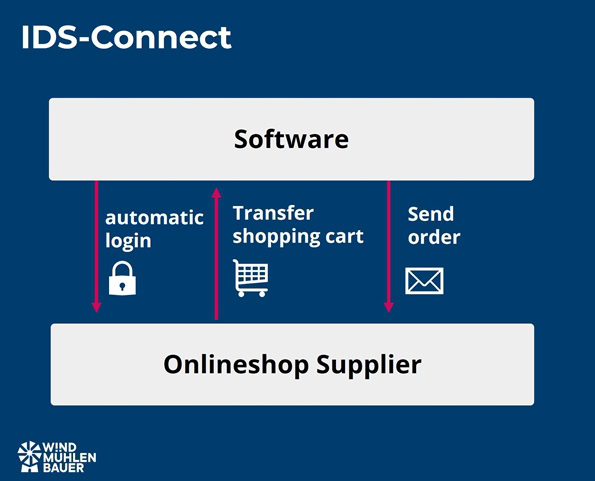
Why IDS Connect is indispensable!
The demands placed on skilled trades businesses are growing. Customers expect quick quotes, accurate calculations, and fast order processing. At the same time, internal processes must be designed efficiently in order to remain competitive. Craftsman software supports these processes. Providing this software with up-to-date information requires a great deal of manual maintenance. This is where the IDS Connect interface comes in. IDS stands for “Integrated Data Interface” and enables the following applications:
- Direct access to current product data such as prices, images, texts, and stock availability
- Automated data exchange between craftsman software and supplier online shops
- Reduction of manual work steps, which saves time and minimizes errors
For example, craftspeople used to have to manually transfer product data from catalogs or quotations into their system. This is a time-consuming and error-prone process, especially in dynamic markets. IDS Connect digitizes this step.
Use cases of the IDS Connect interface in practice
Various use cases can be optimized with this interface. Below you will find five possible applications:
Efficient shopping cart processing
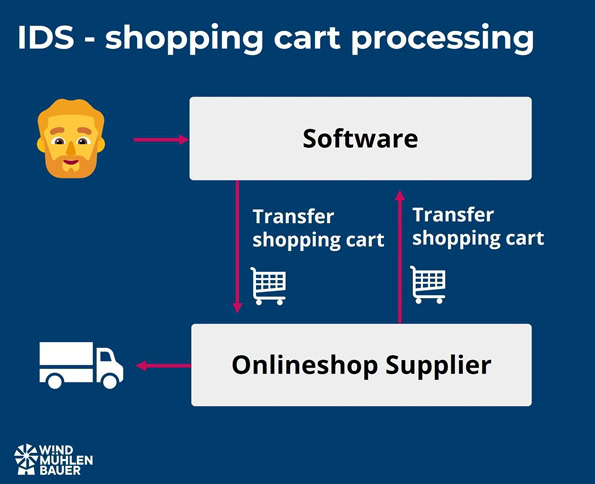
A central use case of IDS Connect is the processing of shopping baskets.
Practical example:
A company in the air conditioning sector uses its tradesman software to create a shopping cart with the materials required for the customer order. This is sent directly to the supplier via IDS Connect. Alternatively, the company can import a shopping cart created in the online shop into its software for further processing—whether for calculations, quotes, or orders.
Advantages:
- No double data entry
- Time savings through automated processes
- Direct further processing of the data in your own software
Direct access to article data
IDS Connect makes it possible to call up article information such as prices, availability or technical details in real time. There is no need to leave the system and the interface accesses the required information in the “background”.

Practical example:
An installer is on site with a customer and realizes that a spare part is needed. Using the “Article Deep Link” function, he calls up the availability of the article from the wholesaler directly from his software. He can order the item within a few seconds. And without any detours via the office.
Advantages:
- Real-time data saves unnecessary inquiries
- Inspire customers by passing on information quickly
- Optimization of the entire process from the quotation to the order to invoice processing with the supplier
Quotation preparation
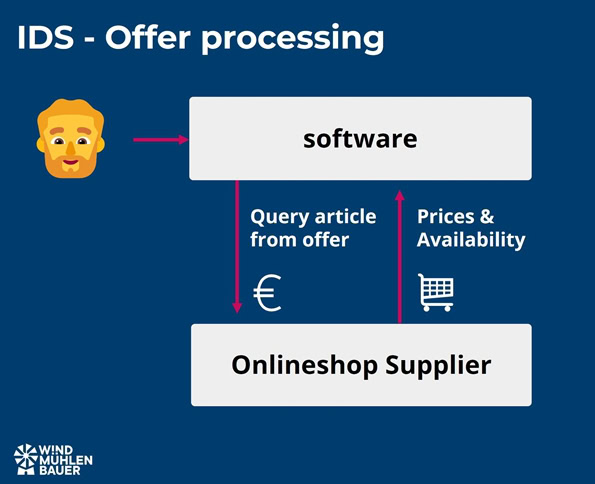
IDS Connect makes it much easier to create quotations, as current article data can be integrated directly.
Practical example:
A roofer visits a customer on site and discusses the plans for the new roof with them. Using the integrated data interface (IDS Connect), he adds current prices and availability directly to his quotation. The finished quotation is sent to the customer by e-mail within a few minutes.
Advantages:
- Fast quotation preparation increases customer satisfaction
- More precise calculations thanks to daily updated data
- Reduced administrative effort thanks to automated processes
Order processing
The IDS interface also offers considerable advantages when processing orders, as all relevant data is available centrally.

Practical example:
A drywall installer receives an order for additional projects. Using IDS Connect, he accesses his supplier’s product data and imports it directly into his order. Changes or additions can be made in real time without having to overcome media breaks between different systems.
Advantages:
- Efficient order processing through direct integration of article data
- Seamless communication between tradesman software and online store
- Error reduction through automatic data transfer
Always up-to-date data thanks to integration of supplier systems
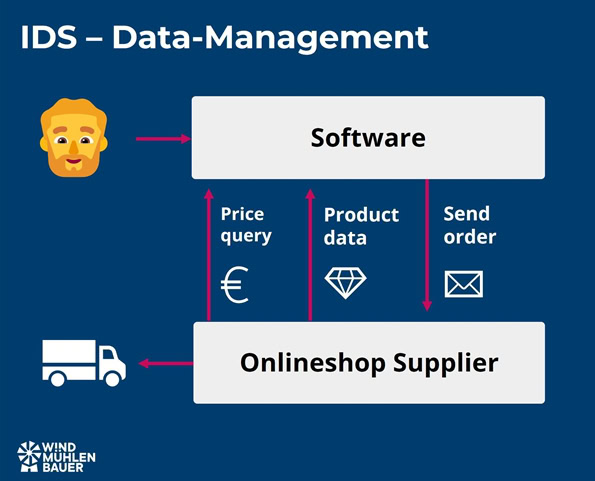
IDS Connect creates a seamless connection between craftsman software or your ERP system and supplier online shops. This ensures that product data is always up to date and available in your own system.
Practical example:
A painting company uses IDS Connect to access its wholesaler’s store system directly from its software. There he can search for products, compare prices and place orders. And all this without leaving the software.
Advantages:
- Centralized processes without media disruptions
- Increased efficiency in product search and ordering
- Better overview of available products
Advantages of IDS Connect for trade businesses
The introduction of IDS Connect brings numerous advantages:
- Time saving: routine tasks such as manually transferring data are no longer necessary
- Error reduction: Automated processes minimize input errors
- Cost control: Costs can be calculated more precisely thanks to daily price queries
- Flexibility: data can be called up at any time, whether in the office or on the construction site
- Customer satisfaction: Fast quotation and order processing strengthens the relationship with the customer
Which ERP or craftsmen software offers this interface?
Here you will find an overview of software providers that offer the IDS Connect interface. Depending on the license model and software maturity, providers may be missing. I recommend contacting the current or potential software provider directly to discuss the details.
- HERO Software
- Handwerksd ata
- Haufe X360 Cloud ERP from Nexaion integrated
- Streit V.1
- Landrix Handwerk
- Das Programm
- Pds Software
- M-Soft
- LC-Top
What needs to be considered during implementation?
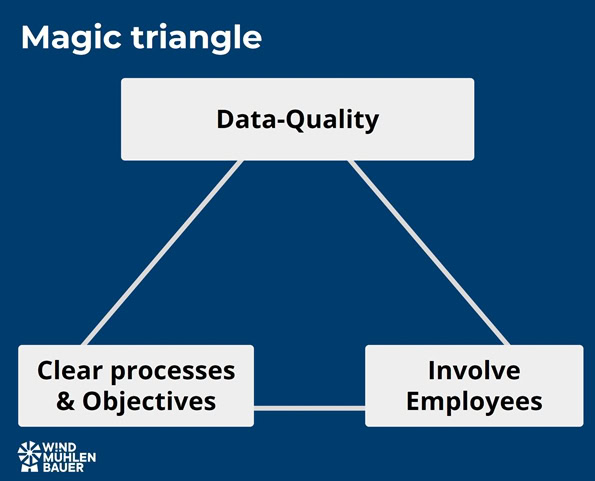
Data quality is the foundation of the process. Clean article master data should be stored in the craftsman software. This means that the article number must be unique. The manufacturer’s article number or the EAN number can be used for this purpose. This is important so that the articles can be identified via the interface.
It is also important to look at the processes and objectives . Not every option that can be implemented with this interface is relevant for your company. The individual steps need to be defined before the technical implementation.
If colleagues and employees are involved, they should be involved at an early stage. Acceptance can arise through participation. After all, what good is the best data quality and a first-class process if they are not used?
What is the difference to OCI, UGL, OMD, cXML Punchout and the DATANORM catalog format?
In addition to IDS Connect, there are other interfaces and data formats that enable cross-system work. The following section is intended to help highlight the differences. These “tools” for optimal processes depend on the selected system (e.g., craftsman software, ERP system), the objectives, and the technical capabilities of your most important suppliers.
OCI interface
OCI steht für Open Catalog Interface. This interface was developed by SAP and has become standard in many ERP systems. Companies in the manufacturing industry in particular rely on this interface. There are now also special purchasing systems, known as e-procurement systems, that rely on this interface.
Function:
- Import articles from the supplier’s online store into the tradesman software or ERP system.
Difference to IDS-Connect:
- A separate interface (e.g. EDI) is required for the transmission of orders
DATANORM Catalog
DATANORM is a structured data format developed for creating and maintaining product data in craftsman software. This includes basic data such as item number, description, and price. This catalog format is also referred to as static, as every change requires a new DATANORM catalog to be generated by the supplier and imported into the software used by the trade business.
Function:
- Creation and maintenance of article data
Difference to IDS-Connect:
- Static catalog format as opposed to the dynamic IDS interface, also known as dynamic catalog
- Article creation possible in the craftsman software
- Supplement to IDS Connect. First create the articles with DATANORM and then keep prices up to date with IDS Connect
OMD interface
OMD stands for Open Masterdata. Like the IDS Connect interface, OMD was developed by ITEK GmbH. Anyone working with the DATANORM catalog format can use it to add missing information such as images or data sheets as required. In the medium term, OMD is intended to replace the outdated DATANORM format.
Function:
- Mit Open Masterdata können in Echtzeit Artikeldaten vom Lieferanten abgerufen werden. Dazu wird eine Artikelnummer oder die EAN (bzw. GTIN) benötigt. Diese kann manuell angegeben werden oder aus dem DATANORM Katalog ausgewählt werden.
Difference to IDS-Connect:
- For articles that are not in the article data master in the craftsman software, images, texts, prices or service specifications can be called up, for example
- Creation of new articles in the craftsman software possible
- Similar function to the “article deep link” of IDS 2.5, but a different data standard
UGL interface
UGL is the abbreviation for “Übergabeschnittstelle Lang”. This was originally developed by the wholesale group “GC Group”. The UGS description (transfer interface) served as the basis for this.
Function:
- An Excel file will be downloaded from the supplier’s online store. The information it contains is used to create quotations or orders. The focus of this “interface”, which is more like a catalog such as DATANORM, is the exchange of documents.
Difference to IDS-Connect:
- IDS-Connect is an automatic and modern interface. With UGL and UGS, the data must be imported manually
- Pure focus on the exchange of documents such as orders
cXML Punchout Catalog
The Punchout Catalog works similarly to the OCI standard and was developed by Ariba in the USA. Systems from Oracle, Coupa, and SAP Ariba rely on this standard. Similar to IDS Connect, orders can be transmitted via this interface. In addition, order confirmations, dispatch advices, or invoices can be returned.
Function:
- Import articles from the supplier’s online store into the tradesman software or ERP system.
Difference to IDS-Connect:
- A separate interface (e.g. EDI) is required for the transmission of orders
- Can import the supplier’s return messages into the craftsman’s system via the interface in addition to the order
Conclusion
IDS Connect professionalizes the way craft businesses work through seamless digital processes. Whether it’s shopping cart processing, product data updates, or quote creation, the possibilities are endless and offer enormous potential for increasing efficiency. For businesses, this not only means time savings and error minimization, but also increased customer satisfaction. Based on my many years of experience, three points are crucial for achieving first-class processes. Get your team on board and actively involve them in the change. Focus on high data quality. This will not only help you with quotations and orders, but also with warehouse processes in the future. And finally, clearly define the goal and implement the planned process in the short term. Get your company ready for the digital future!

Peter Prütting is an expert in value-oriented and digital business development. With over 15 years of sales experience from the perspectives of wholesale, manufacturing, and e-marketplaces, he takes a holistic view. His colleagues value him as a customer-centric and focused leader who guides teams through digital transformation. Away from his daily work, he recharges his batteries by mountain biking.
FAQ – Frequently asked questions
The IDS Connect interface was developed by the associations BVBS (Bundesverband Bausoftware e.V.), DG Haustechnik (Deutscher Großhandelsverband Haustechnik) and ZVSHK (Zentralverband Sanitär Heizung Klima) in cooperation with ITEK GmbH.
Many craftsman software solutions such as HERO, Handwerksdata, Haufe X360, Streit V.1, Landrix Handwerk, Das Programm, Pds Software, M-Soft and LC-Top offer IDS Connect integration.
Data quality is the foundation of the process, so the craftsman software should contain clean article master data with unique article numbers. It is important to define the relevant processes and involve colleagues and employees at an early stage in order to create acceptance.
IDS Connect offers time savings by eliminating manual data transfer, error reduction through automated processes and better cost control through daily price queries. It also enables greater flexibility thanks to data that can be called up at any time and increases customer satisfaction through faster quotation and order processing.
Yes, IDS Connect enables a seamless connection between your tradesman software and the online shops of various suppliers. You can search for products, compare prices, and place orders without leaving your software.
Yes, IDS Connect makes it possible to check item availability and place orders directly on site at the customer’s premises without having to leave the software or return to the office.
It is worth checking with your supplier. Here is a short selection of companies: Building materials trade – Baustoff Union, HVAC sector – Richter & Frenzel, electrical wholesalers – Fega & Schmitt.
Sources
- ITEK, interface description: https://www.itek.de/
- WMB Magazine, Dynamic Catalogs and Interfaces WMB Magazine by Peter Prütting
- Datanorm, Information platform DATANORM.de – Information platform, software and services
- GC-GROUP, Long transfer interface, Service interfaces | GC-GROUP