How does a Punchout catalog work? ➡️ Functionality and advantages at a glance
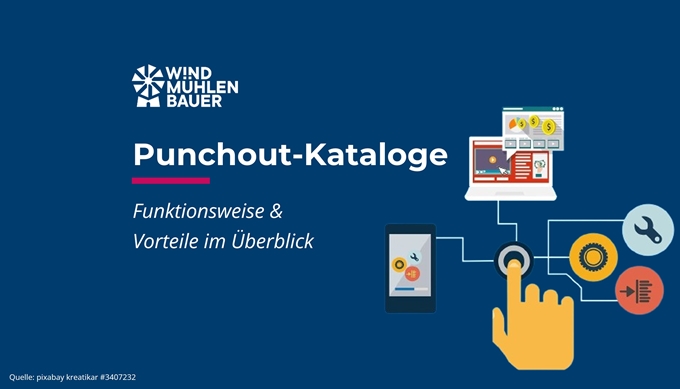
Punchout catalogs are also called dynamic catalogs. This is because they are updated in a matter of seconds. This ensures that the latest Product Data, prices and delivery times are available to the customer. In the following sections, you will find out how punchout catalogs interact with your customers’ purchasing systems and what benefits they offer you as a supplier.
What is a Punchout catalog?
A punchout catalog is an integrated connection to the purchasing system of your customer (purchasing company). As a rule, the company’s own online store is used as the basis for the punchout catalog. By changing the shopping cart process, the order is sent via an interface to the customer’s purchasing system rather than to your own system. This catalog is integrated via the cXML or OCI standards. This means that the customer’s purchasing system remains the leading system and subsequent processes can be used as usual.
What does the punch-out process look like in concrete terms?
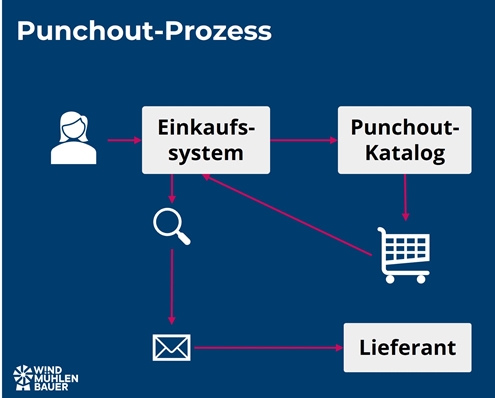
Your customer’s employee logs into their purchasing system. There he selects the relevant Punchout catalog. This automatically redirects the employee and logs them in. In this “catalog”, the employee searches for the desired items and places them in the shopping cart. The interface is usually similar to the supplier’s online store.
Once the shopping basket has been sent, it is forwarded back to the purchasing system. There, the employee can adjust the order or add accounting information (e.g. the cost center). Once the order information has been confirmed in the purchasing system, the process of approval by the cost center manager or supervisor begins. After approval, the supplier receives the final purchase order. This workflow is shown in the following image.
Which systems can interact with Punchout catalogs?
There are two standards on the market. The cXML standard is mainly found in systems originating from American regions. The OCI standard is widely used in European systems. All relevant purchasing systems such as e-marketplaces, e-procurement systems or ERP systems can process punchout catalogs. You can find a brief overview here:
Systems that use the cXML punchout catalog:
Systems that use the OCI punchout catalog:
- Mercateo Unite
- Simple system
- Onventis
- DIG
- SAP ECC or SRM
- WPS
- And many more
Advantages and disadvantages of Punchout catalogs
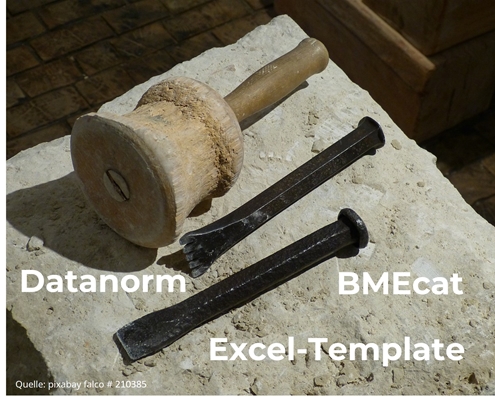
As a rule, your customer has two catalog types that they can integrate into their purchasing system. Static catalogs can be integrated. There are formats such as BMEcat, Datanorm or Excel templates. I like to compare these with stone tablets. Because every time a change is made, a new sheet has to be created and sent to the customer.
Dynamic catalogs, on the other hand, update the data in a matter of seconds and reduce the maintenance effort through automation. These include the punchout catalogs presented above. The following table shows the advantages and disadvantages of this type of catalog. There are other functions that reduce the disadvantages. These must be technically mastered and strategically desired by both the supplier and the customer system.
| Feature | Static catalog (e.g. BMEcat) | Dynamic catalog (e.g. OCI, cXML) |
|---|---|---|
| Data sovereignty | Customer | Supplier |
| Narrow down the range | ✅ | ✅ |
| Comparability and searchability in the purchasing system | ✅ | ❌ (with the exception of the background search of OCI or level 2 for cXML) |
| Article configuration | ❌ Only possible with effort | ✅ |
| Controlled price approval by the customer | ✅ | ❌ |
| Indication of stock levels | ❌ | ✅ |
| Up-to-dateness of prices, descriptions etc. | After upload and approval by the customer | Always up to date |
| User interface | In the customer’s design | In the supplier’s design |
| Menu and article structure | In customer logic | In supplier logic |
| Order is sent via the customer system | ✅ | ✅ |
| Goods receipt and invoice are posted in the customer system | ✅ | ✅ |
How does onboarding work?
To integrate external catalogs into the purchasing system, you need an online store or website or an external solution (e.g. Primus Shop) with the appropriate interface. Depending on the purchasing system, a cXML or OCI interface must be implemented.
As a first step, I recommend clarifying the commercial details with your customer, such as prices, product range, leading purchasing system and locations or departments authorized to place orders.
On this basis, the punchout catalog can be configured on the supplier side in the second step. Important information such as URL, user or password or shared secret is shared with the contact person of the customer system. This can be a service provider, the customer themselves or the provider of the purchasing system.
In the third step, the integration of the Punchout catalog is implemented and tested. After the successful test, live operation begins. In the optional fourth step, the ordering process for the order and subsequent processes such as goods receipt and invoicing are discussed. This step offers great potential for automation using EDI. You can find details on this process automation in the article “What is EDI?”.
My conclusion
Punchout catalogs have many advantages. Manual updating of data and prices is no longer necessary, as this has already been done in your ERP system (merchandise management system). The customer can view stock levels and order configurable items. As a supplier, this type of catalog is particularly useful for regular changes to Product Data, prices or stock levels. No team is required to create catalogs and upload them to the customer. Unlike static catalogs, no customer approval is required. This saves you time as a supplier, as all order-relevant information is identical in the customer system and your ERP system. This eliminates the need for price differences, ordering “old” items or last-minute appointment requests from your customer.
In addition to the many advantages, dynamic catalogs also have a few disadvantages for the customer. Therefore, it depends on the strategic position and your goal as a supplier. In my experience, it is possible to convince the customer of Punchout catalogs in the medium term. At the latest when the lack of comparability in the purchasing system is restored with OCI Backgroundsearch or Punchout Level 2.
Punchout catalogs qualify you for customers who require Punchout-capable suppliers and increase your reputation with your customers!

Peter Prütting is an expert in value-oriented and digital business development. With over 15 years of sales experience from the perspectives of wholesale, manufacturing, and e-marketplaces, he takes a holistic view. His colleagues value him as a customer-centric and focused leader who guides teams through digital transformation. Away from his daily work, he recharges his batteries by mountain biking.
Looking for a punchout catalog?
We help you find the right solution and implement it quickly.
FAQ – frequently asked questions
A punchout catalog is an integrated connection to the purchasing system of your customer (purchasing company). As a rule, the company’s own online store is used as the basis for the punchout catalog. By changing the shopping cart process, the order is sent via an interface to the customer’s purchasing system rather than to your own system. This catalog is integrated via the cXML or OCI standards. This means that the customer’s purchasing system remains the leading system and subsequent processes can be used as usual.
Your customer’s employee logs into their purchasing system. There he selects the relevant Punchout catalog. This automatically redirects the employee and logs them in. In this “catalog”, the employee searches for the desired items and places them in the shopping cart. The interface is usually similar to the supplier’s online store.
Once the shopping basket has been sent, it is forwarded back to the purchasing system. There, the employee can adjust the order or add accounting information (e.g. the cost center). Once the order information has been confirmed in the purchasing system, the process of approval by the cost center manager or supervisor begins. After approval, the supplier receives the final purchase order.
Yes, the interfaces to Punchout catalogs are usually via cXML (Commerce Extensible Markup Language) or OCI (Open Catalog Interface). All relevant purchasing systems such as ERP systems, e-procurement systems or e-marketplaces offer such interfaces.
With a Punchout catalog, you get the following benefits:
– Conduct business through the purchasing systems in the same way as the world’s largest companies
– Qualify for potential key account customers Punchout-enabled suppliers need
– Enhance the shopping experience by creating an environment tailored to your products
– Upsell and/or cross-sell additional products
– Data analysis by tracking customer and search behavior
A Punchout catalog level 2 is a combination of a Punchout catalog level 1 and an index file. The index file, which functions like a static catalog, lists all items that can also be ordered via the Punchout catalog. This combination enables a comprehensive search, and items can be compared and purchased in the purchasing system.
These are two different interfaces that transport Product Data from an external system into the purchasing system. cXML was developed by Ariba and OCI by SAP. The functionality for the end user at the customer is the same for both interfaces.
Additional functions can be added to the OCI interface. These must be supported by both the supplier and the customer system.
DETAIL: Creates a link in the purchasing system. This allows quick access to further product information in the OCI catalog.
VALIDATE: Price and delivery time changes are queried when the shopping cart is transferred.
BACKGROUND_SEARCH: Searches carried out in the purchasing system are also carried out in the OCI catalog and displayed in the purchasing system.
Sources
- SAP, Help for the dynamic catalog: https://help.sap.com/
- SAP, Guideline OCI
- Ariba, Setup: https://helpcenter.ariba.com/